Printing on Special Paper: How to Print with Optimal Quality?
Tip!: Check the machine status before printing!
 Is the print head OK?
If a print head nozzle is clogged, print will be faint and papers will be wasted. Print the nozzle check pattern to check the print head.
Is the inside of the machine smeared with ink?
After printing large quantities of paper or performing borderless printing, the area where papers go through may get smeared with ink. Clean the inside of your machine with Bottom Plate Cleaning.
 Cleaning the Inside of the Machine (Bottom Plate Cleaning)
Tip!: Check how to load the paper correctly!
Is the paper loaded in the correct orientation?
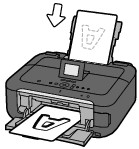
When loading paper in the rear tray or cassette, make sure the orientation of paper.
|
|
|
|
rear tray |
cassette |
To load paper in the rear tray, load paper with the printing side facing you.
|
To load paper in the cassette, load paper with the printing side facing down.
|
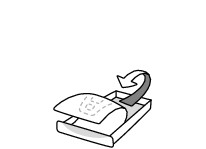
Is the paper curled?
The curled paper causes paper jam. Flatten the curled paper, then reload it.
"Load the paper after correcting its curl." in Paper Is Smudged/Printed Surface Is Scratched
