Inside View
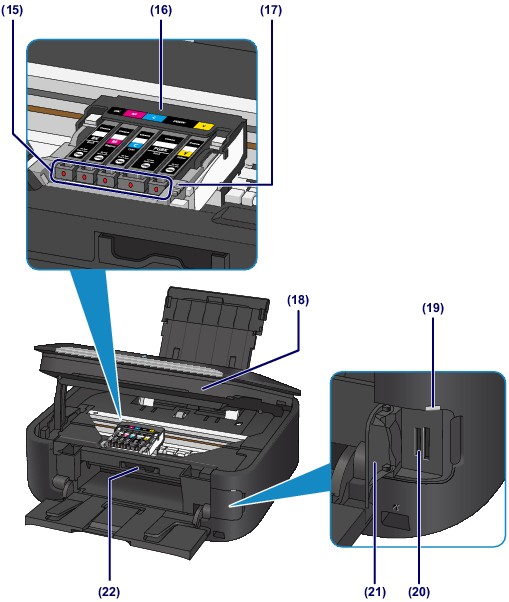
(15) ink lamp
Lights or flashes red to indicate the ink tank status.
 Checking the Ink Status with the Ink Lamps
(16) print head holder
The print head is pre-installed.
(17) print head lock lever
Locks the print head into place.
 Important Important
|

(18) scanning unit / cover
Scans originals. Open it to replace an ink tank, to check the ink lamp, or to remove jammed paper inside the machine. When opening the scanning unit / cover, lift it with the document cover closed.
(19) Access lamp
Lights or flashes to indicate the memory card status.
(20) card slot
Insert a memory card.
Before Inserting the Memory Card
(21) card slot cover
Open to insert a memory card.
(22) inner cover
Open by pulling it out to attach the disc tray. Use only when printing onto a printable disc. Keep closed for normal operation.
 Note Note
|
