You can check the printer status and connection performance.
To display the Status screen, select Status from the View menu.
 Note
Note-
When using Wired LAN, Signal Strength:, Link Quality: and Advanced Measurement... are not available.
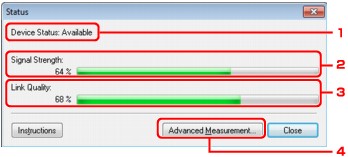
-
Device Status:
The device status is displayed as Available or Unavailable.
-
Signal Strength:
Indicates the strength of the signal received by the printer, ranging from 0% to 100%.
-
Link Quality:
Indicates the signal quality excluding the noise while communicating, ranging from 0% to 100%.
-
Advanced Measurement...
To examine the connection performance between the printer and the access point or between the printer and the computer.
When you click, the Connection Performance Measurement is displayed.

