
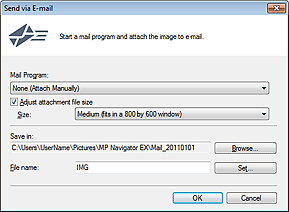
Click Send in the View & Use window, then click Attach to E-mail on the list to open the Send via E-mail dialog box.
In the Send via E-mail dialog box, you can make advanced settings for attaching images to e-mail.
 Important
MP Navigator EX is compatible with the following e-mail software programs:
- Microsoft Outlook
- Windows Live Mail
- Windows Mail (Windows Vista)
- Outlook Express (Windows XP)
(If an e-mail software program does not operate properly, check that the program's MAPI is enabled. To enable MAPI, refer to the manual of the e-mail software program.)
 Note
NoteOnly PDF and JPEG files can be attached to e-mail.
Mail Program
The e-mail software program set up on the General tab of the Preferences dialog box is displayed. Select the e-mail software program you want to use.
Adjust attachment file size
When the file type is JPEG, selecting this checkbox allows you to resize the images. Select a size from Size.
Save in
Displays the folder in which to save the images. To change the folder, click Browse... to specify another one. If resized, the resized images are saved.
By default, the scanned images are saved in the following folders.
Windows 7: MP Navigator EX folder in My Pictures folder
Windows Vista: MP Navigator EX folder in Pictures folder
Windows XP: MP Navigator EX folder in My Pictures folder
File name
Enter the file name of the image to be attached (up to 64 characters). When saving multiple files, 4 digits are appended to each file name.
Set...
You can specify a compression type for JPEG files. Select High(Low Compression), Standard, or Low(High Compression).
