
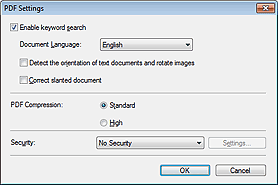
In the PDF Settings dialog box, you can specify the PDF compression type and other advanced settings for creating PDF files.
 Important
Only the Security setting is available for images with resolutions outside the range of 75 dpi to 600 dpi.
Enable keyword search
Select this checkbox to convert characters in a document to text data. This will enable an easy search by keyword.
Document Language
Select the language of the document to be scanned.
Detect the orientation of text documents and rotate images
Select this checkbox to detect the orientation of the document from the scanned text and rotate the scanned image to the correct orientation.
ImportantThis function may not work properly depending on the document language. Only text documents written in languages that can be selected from Document Language are supported.
The orientation of the following types of documents may not be corrected, as the text cannot be detected correctly.
- Resolution is outside the range of 300 dpi to 600 dpi
- Font size is outside the range of 8 points to 48 points
- Documents containing special fonts, effects, italics, or hand-written text
- Documents with patterned backgrounds
Correct slanted document
Detect the scanned text and correct the angle (within -0.1 to -10 degrees or +0.1 to +10 degrees) of the document.
ImportantThe inclination of the following types of documents may not be corrected, as the text cannot be detected correctly.
- Documents in which the text lines are inclined more than 10 degrees or the angles vary by line
- Documents containing both vertical and horizontal text
- Documents with extremely large or small fonts
- Documents with small amount of text
- Documents containing figures/images
- Hand-written documents
- Documents containing both vertical and horizontal lines (tables)
PDF Compression
Select a compression type for saving.
Standard
It is recommended that you normally select this setting.
High
Compresses the file size when saving, allowing you to reduce the load on your network/server.
ImportantHighly compressed PDF images may degrade if you repeatedly save them with high compression.
ImportantCompression type cannot be set when Color Mode is Black and White.
Compression type cannot be set when scanning by selecting PDF on the operation panel of the machine.
Security
Set passwords for opening, editing, and printing the created PDF files.
ImportantThis function is not available when images are automatically saved after scanning.
 Note
NoteSelect Password Security and set passwords in the Password Security -Settings dialog box.

