
On the Scanner tab, you can specify the following settings.
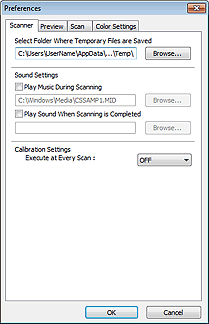
Select Folder Where Temporary Files are Saved
Displays the folder in which to save images temporarily. To change the folder, click Browse... to specify another one.
Sound Settings
You can set the machine to play music during/at the end of a scan.
Select the Play Music During Scanning or Play Sound When Scanning is Completed checkbox, then click Browse... and specify a sound file.
You can specify the following files.
- MIDI file (*.mid, *.rmi, *.midi)
- Audio file (*.wav, *.aif, *.aiff)
- MP3 file (*.mp3)
Calibration Settings
When you set Execute at Every Scan to ON, the scanner will be calibrated every time before previewing and scanning, to reproduce correct color tones in scanned images.
 Note
NoteEven when Execute at Every Scan is set to OFF, the scanner may be calibrated automatically in some cases (such as immediately after you turn the machine on).
Calibration may take time depending on your computer.
