 Important
-
While IJ Network Scanner Selector EX is enabled, it periodically transmits packets to check whether it can communicate with the machine over the network. When using the computer in a network environment other than the one used to set up the machine, disable IJ Network Scanner Selector EX.
 Note
Note-
If
 (Enabled) is not displayed in the notification area of the taskbar, from the Start menu, select All Programs > Canon Utilities > IJ Network Scanner Selector EX > IJ Network Scanner Selector EX.
Menu
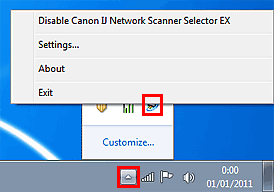
Displays when you right-click the IJ Network Scanner Selector EX icon in the notification area of the taskbar.
-
Disable Canon IJ Network Scanner Selector EX / Enable Canon IJ Network Scanner Selector EX
Enables or disables IJ Network Scanner Selector EX.
When you select Disable Canon IJ Network Scanner Selector EX, you will not be able to scan over a network using the operation panel of the machine.
Enabled:
, Disabled: 
-
Settings...
The Scan-from-PC Settings screen appears. You can select the product you want to use.
-
About
Displays the version information.
-
Exit
Exits IJ Network Scanner Selector EX.
(Enabled) disappears from the notification area of the taskbar.
Scan-from-PC Settings Screen
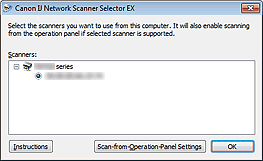
The machine must be selected with IJ Network Scanner Selector EX before scanning over a network.
In the notification area of the taskbar, right-click the icon and select Settings... to display the Scan-from-PC Settings screen.
-
Scanners
MAC addresses of the scanners that can be used over the network are displayed.
You can select one scanner per model.
-
Instructions
This page appears.
When multiple model names are displayed in Scanners, the page for the model at the top of the list appears.
Note-
If the target model name is not displayed at the top of the Scanners list, from the Start menu, select All Programs > "Canon XXX series Manual" (where "XXX" is the model name) > "Canon XXX series On-screen Manual" (where "XXX" is the model name).
-
-
Scan-from-Operation-Panel Settings
The Scan-from-Operation-Panel Settings screen appears. You can select the scanners from which you want to scan using the operation panel.
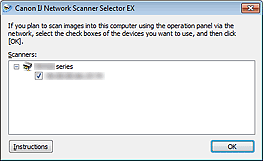
Scan-from-Operation-Panel Settings Screen
Displays when you click Scan-from-Operation-Panel Settings in the Scan-from-PC Settings screen.
-
Scanners
MAC addresses of the scanners that can be used over the network are displayed.
You can select up to three scanners.
-
Instructions
This page appears.
When multiple model names are displayed in Scanners, the page for the model at the top of the list appears.
Note-
If the target model name is not displayed at the top of the Scanners list, from the Start menu, select All Programs > "Canon XXX series Manual" (where "XXX" is the model name) > "Canon XXX series On-screen Manual" (where "XXX" is the model name).
-
Note-
If the machine you want to use is not displayed, check the following conditions and click OK to close the screen, then reopen it and select the machine.
- The MP Drivers is installed
- Network settings of the machine is completed after installing the MP Drivers
- Network communication between the machine and computer is enabled
If the machine is still not displayed, see "Problems with Network Communication."
-
You do not need to use this software when scanning via USB. See "Uninstalling IJ Network Tool/IJ Network Scanner Selector EX" to delete it. You can scan via USB even if it is not deleted.
