
In this window, you can search for images on photo sharing sites on the Internet and download the images you want to print.
 Important
Internet connection is required to use this function. Internet connection fees apply.
This product uses the Flickr API but is not endorsed or certified by Flickr.
To display the Import Photos from Photo Sharing Sites window, click  (Import photos from photo sharing sites) in the Select Images screen or Add Image dialog box. To display the Add Image dialog box, select the page you want to add images to in the Edit screen, then click
  (Add Image).
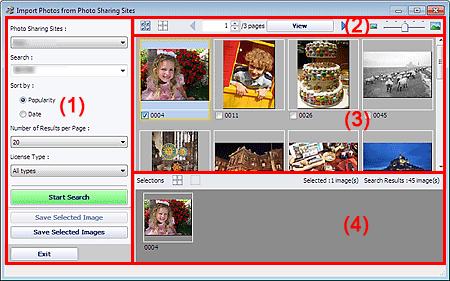
(1) Settings and Operation Buttons Area
(2) Toolbar
(3) Thumbnail Window
(4) Selections Area
Photo Sharing Sites
Displays the name of the photo sharing site.
Search
Enter the search text.
 Note
NoteAlternatively, click  (Down arrow) to display up to 20 search history records and select among them.
When you want to enter multiple keywords, insert a space between the keywords.
When search history exists, you can delete the records of previously entered keywords by selecting Clear History displayed at the bottom of the list.
Sort by
Select how to sort the search results in the Thumbnail window. Select Popularity or Date.
You cannot change the setting after a search.
Number of Results per Page
Select the number of images displayed in the Thumbnail window, from 10, 20 and 30.
You cannot change the setting after a search.
License Type
Select the license type of images to search for, from All types, CC license (Non-Commercial) and CC license (Others).
Select All types to display all images regardless of license type.
Select CC license (Non-Commercial) to display CC licensed images that can be used for non-commercial purposes only. Select CC license (Others) to display other CC licensed images.
NoteLicense type varies by image. Point to an image to display a tooltip in which you can check the license type.
License Type |
License Type |
Usage Precautions/Conditions (Comply with the following conditions when using CC licensed images except for personal use or use within the home.) |
|---|---|---|
All types |
All Rights Reserved |
Unauthorized copying of images is illegal except for personal/home use or for use within such limited scope. Copying portraits (photographs of persons) may infringe personality rights. |
Attribution Non-Commercial (CC license) |
- You must show the title and licensor of the original work along with your creation. - You may not use the work for commercial purposes. |
|
Attribution Non-Commercial No Derivatives (CC license) |
- You must show the title and licensor of the original work along with your creation. - You may not use the work for commercial purposes. - You may not modify the work. |
|
Attribution Non-Commercial Share Alike (CC license) |
- You must show the title and licensor of the original work along with your creation. - You may not use the work for commercial purposes. - Even if your creation is built upon the work of others, you must apply the same conditions to it as those set out for the original work by the licensor. |
|
Attribution (CC license) |
- You must show the title and licensor of the original work along with your creation. |
|
Attribution No Derivatives (CC license) |
- You must show the title and licensor of the original work along with your creation. - You may not modify the work. |
|
Attribution Share Alike (CC license) |
- You must show the title and licensor of the original work along with your creation. - Even if your creation is built upon the work of others, you must apply the same conditions to it as those set out for the original work by the licensor. |
|
CC license (Non-Commercial) |
Attribution Non-Commercial (CC license) |
- You must show the title and licensor of the original work along with your creation. - You may not use the work for commercial purposes. |
Attribution Non-Commercial No Derivatives (CC license) |
- You must show the title and licensor of the original work along with your creation. - You may not use the work for commercial purposes. - You may not modify the work. |
|
Attribution Non-Commercial Share Alike (CC license) |
- You must show the title and licensor of the original work along with your creation. - You may not use the work for commercial purposes. - Even if your creation is built upon the work of others, you must apply the same conditions to it as those set out for the original work by the licensor. |
|
CC license (Others) |
Attribution (CC license) |
- You must show the title and licensor of the original work along with your creation. |
Attribution No Derivatives (CC license) |
- You must show the title and licensor of the original work along with your creation. - You may not modify the work. |
|
Attribution Share Alike (CC license) |
- You must show the title and licensor of the original work along with your creation. - Even if your creation is built upon the work of others, you must apply the same conditions to it as those set out for the original work by the licensor. |
Start Search
Starts searching for images, and displays the images that match the search text in the Thumbnail window.
ImportantSome images, such as images in formats other than JPEG, do not appear.
Save Selected Image
Saves the image selected in the Selections area.
Save Selected Images
Saves all the images displayed in the Selections area.
Exit
Click to close the Import Photos from Photo Sharing Sites window.
 (Select all images)
Selects all the images in the page displayed in the Thumbnail window.
When you select an image, a checkmark appears in its checkbox.
NoteYou can select up to 300 images.
 (Clear all check-marks)
Cancels all image selections in the page displayed in the Thumbnail window.

 (Back to the previous page/Go to the next page)
Displays the previous/next page.
 Page number entry box/Total pages/View
Enter a page number and click View to display the page.
 Thumbnail Size Slider
Resizes the images in the Thumbnail window.
Move the slider to the right to enlarge and left to reduce the images.
Displays the thumbnails (miniatures) of the search results (images). The title is displayed under each thumbnail.
To select an image, click the thumbnail or checkbox.
ImportantDue to limitations of photo sharing sites, if the search results exceed 4,000 images, the same images as those displayed in the page containing the 4,001st image will be displayed in all the subsequent pages.
For example, when Number of Results per Page is set to 20, the images displayed in page 201 are the same as those displayed in page 202 and subsequent pages.
NotePoint to a thumbnail to display its title, license type and other information.
Right-click a thumbnail and select Open web page of work from the displayed menu to start a browser and display the page of a photo sharing site on which the image is posted.
Thumbnails of the images selected in the Thumbnail window are displayed, along with the number of images (number of selected images/number of search results).
(Cancel all image selections)
Cancels all image selections in the Selections area.
 (Cancel image selection)
Cancels the selection of images selected in the Selections area.
NoteRefer to "Downloading Images from Photo Sharing Sites" for details on how to download images from photo sharing sites.
