Checking the Ink Status with the LCD on the Machine
Make sure that the power is turned on, and press the HOME button.
The HOME screen will appear.
Select
 Setup on the HOME screen.

The setup menu screen will appear.
Select
 Display remaining ink level, then press the OK button.
A symbol appears in the area (A) if there is any information about the remaining ink level.
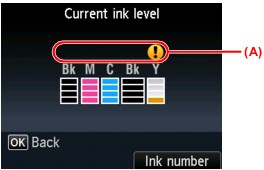
Example: 
Ink tank is running low. Prepare a new ink tank.
 Note Note
|

