Aligning the Print Head
If printed ruled lines are misaligned or print results are otherwise unsatisfactory, adjust the print head position.
 Note Note
From the machine
From the computer
|


You need to prepare: a sheet of A4 or Letter-sized Matte Photo Paper MP-101
Make sure that the power is turned on.
Load a sheet of supplied paper or A4 or Letter-sized Matte Photo Paper MP-101 in the rear tray.
Load the paper with the print side (whiter side) facing you in the rear tray.
 Important Important
|
Open the paper output tray gently, and open the output tray extension.
| Important
|
Adjust the print head position automatically.
(1) Select  Setup on the HOME screen.
The setup menu screen will appear.
(2) Select  Maintenance, then press the OK button.
The Maintenance screen will appear.
(3) Select Auto head alignment, then press the OK button.
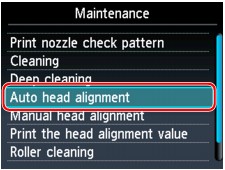
The confirmation screen will appear.
(4) Select Yes, then press the OK button.
The print head alignment sheet will be printed and the print head position will be adjusted automatically.
This takes about 5 minutes.
| Important
|
| Note
|
(5) When the completion message appears, press the OK button.
The screen will return to the Maintenance screen.
| Note
From the machine
From the computer
|
