
The Scan Settings dialog box opens when you click Specify... in the Scan/Import window.
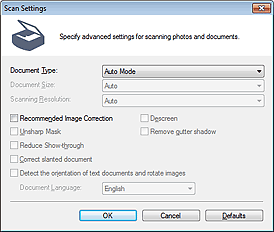
Document Type
Auto Mode is set.
 Important
Place documents correctly according to the type of document to be scanned. Otherwise, documents may not be scanned correctly.
See "Placing Documents (When Scanning from a Computer)" for details on how to place documents.
Recommended Image Correction
Apply suitable corrections automatically based on the document type.
ImportantWhen this checkbox is selected, the files can be saved in JPEG/Exif or PDF format only.
Scanning may take longer than usual when this checkbox is selected.
The color tone may change from the source image due to corrections. In that case, deselect the checkbox and scan.
Defaults
Restore the default settings.
