You can show photos saved on the memory card or USB flash drive with the slide show.
In the slide show, the photos are displayed one after another automatically.
You can print photos within the slide show.
-
Make sure that the machine is turned on.
-
Select
 Advanced photo on the HOME screen.
 -
Insert the memory card into the card slot or insert the USB flash drive into the direct print port.
 Important
-
You cannot use the memory card and USB flash drive at the same time.
 Note
Note-
If you insert the memory card/USB flash drive before you select Advanced photo on the HOME screen, the photo selection screen in Photo is displayed.
If both photo files and PDF files are saved on the memory card/USB flash drive, the confirmation screen to select which file you print is displayed.
To display the HOME screen, press the HOME button.
-
-
Select
 Slide show, then press the OK button.Note
-
If no printable photo data is saved on the memory card/USB flash drive, Data of supported types are not saved. is displayed on the LCD.
-
If more than 2,000 photo data are saved on the memory card/USB flash drive, the photo data is split by group per 2,000 photos in reverse chronological order (date last modified) automatically. Check the message displayed on the LCD, then press the OK button.
-
-
Use the

 button to select the effect for playback.
The following effects are selectable.
- Standard
- Wide
- Circle
-
To display the photos in the specified range of dates or change the display order, press the right Function button.
If you display the photos in the specified range of dates, follow the on-screen instructions to specify the start and end of the date.
Note -
Press the OK button.
The slide show starts playing back.
Note-
By pressing the OK button while the slide show is played back, the slide show pauses.
You can print the displayed photo by pressing the Color button while the slide show pauses.
-
If you want to view the slide show of another group when the photo data is split by group per 2,000 photos, use the

 button to change the group while the slide show pauses.
-

When Printing Photo
When the slide show pauses by pressing the OK button, you can print the displayed photo.
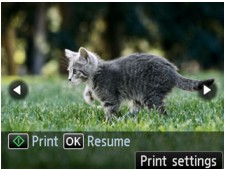
When starting printing, load paper, then press the OK button.
Note-
You can change the print settings by pressing the right Function button.
-
You can select the photo to print by using the
button. When pressing and holding the button, the photo is scrolled by 10 photos. -
To resume the slide show, press the OK button while the slide show pauses.
-
You can resume the slide show by pressing the right Function button while printing. If the printing is not complete, you can print the displayed photo by pausing the slide show again and pressing the Color button.
-
To cancel the slide show, press the HOME button.
