


You can open files created with Easy-PhotoPrint EX.
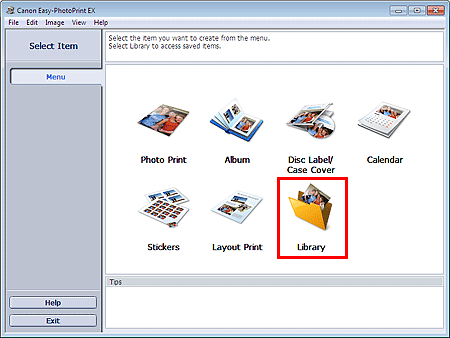
Click Library from Menu.
The Open dialog box appears.
You can check files created and saved with Easy-PhotoPrint EX in icon view (only for Windows 7/Windows Vista) or thumbnail view.
 Important
When using 64-bit editions of Windows 7, Windows Vista, or Windows XP, the contents of files cannot be displayed on Explorer.
Select the file you want to open and click Open.
The Edit screen appears.
ImportantFiles saved from PREMIUM Contents Print cannot be opened from Library.
Edit the file if necessary.
 Note
NoteRefer to the following sections for details on the editing procedures.
NoteEasy-PhotoPrint EX supports the following file formats (extensions).
- Easy-PhotoPrint EX Album file (.el1)
- Easy-PhotoPrint EX Stickers file (.el2)
- Easy-PhotoPrint EX Calendar file (.el4)
- Easy-PhotoPrint EX Layout file (.el5)
- Easy-PhotoPrint EX PREMIUM Contents file (.el7)
- Easy-PhotoPrint EX Disc Label/Cover file (.el8)
- CD-LabelPrint Converted Data (.cldcvt)
You can open files created with Easy-PhotoPrint EX with the following methods, besides from Library in Menu.
- Click Open in the step button area of each screen, then select the file you want to edit.
- Double-click the file.
- From the File menu, click Open..., then select the file you want to edit.
You can also open a recently used file by clicking the file name shown in the File menu.

