 Note
Note-
Select Wired LAN active in Change wireless/wired under LAN settings on the operation panel to change the settings in the Wired LAN sheet.

-
Start up IJ Network Tool.
-
Select the printer in Printers.
-
Select Configuration... from the Settings menu.
-
Click the Wired LAN tab.
The Wired LAN sheet is displayed.
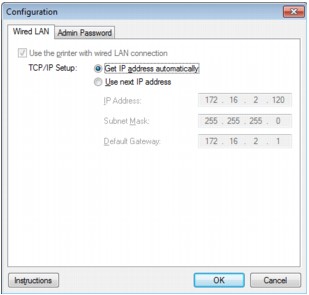
For details on the Wired LAN sheet, see Wired LAN Sheet.
-
Change the settings or confirm.
Sets the IP address of the printer to be used over the LAN. Set a value appropriate for your network environment.
-
Click OK.
After changing configuration, a screen is displayed asking you for confirmation before the settings are sent to the printer. If you click Yes, the settings are sent to the printer and the Transmitted Settings screen is displayed.
