
In the View & Use window of the Navigation Mode screen, you can search images saved on your computer and open them in MP Navigator EX. Opened images can be printed and edited.
 Note
NoteSearch images in My Box (Scanned/Imported Images), Recently Saved Images or a selected folder and its subfolders.
See "Starting MP Navigator EX" to start MP Navigator EX.
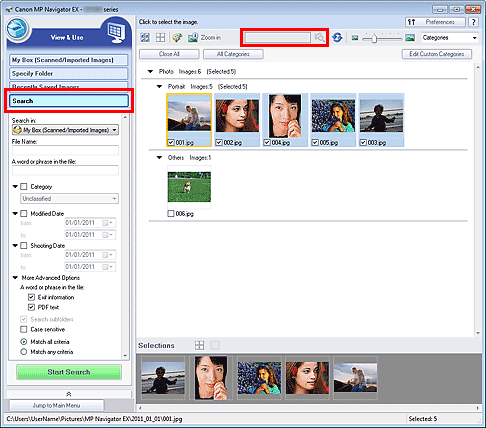
In  (Text box) on the Toolbar, enter a word or phrase included in the file name, Exif information or PDF text of the image you want to search for, then click
  (Search). For Exif information, text in Maker, Model, Description, and User Comment is searched.
Click Search on the left of the screen to open search options. Enter information of the image you want to search for, then click Start Search.
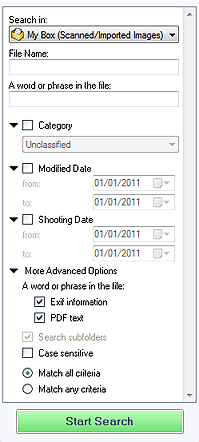
Search in
If you know where to look for, select the drive, folder or network from Specify Folder.
File Name
If you know the file name, enter it.
A word or phrase in the file
Enter a word or phrase included in the items selected in More Advanced Options.
 Important
For PDF files, you can only search for those created with MP Navigator EX. You cannot search PDF files created or edited in other applications. Also, searching PDF files is available only when keyword search is set.
For details of creating PDF files that enables keyword search, see "PDF Settings Dialog Box."
Password-protected PDF files cannot be searched.
Category
You can search for images by category.
Modified Date
To search for images that have been updated in a specific time period, enter the first and last dates of the period.
Shooting Date
To search for images captured in a specific time period, enter the first and last dates of the period.
Note"Shooting date" is the date and time of data creation, which are included in the image's Exif information.
More Advanced Options
A word or phrase in the file
In A word or phrase in the file, select the items to search. If you select the Exif information checkbox, text in Maker, Model, Description, and User Comment is searched. If you select the PDF text checkbox, text in PDF files is searched.
ImportantText in password-protected PDF files cannot be searched.
Search subfolders
Select this checkbox to search subfolders.
Case sensitive
Select this checkbox to match case.
Match all criteria
Searches for files that meet all the specified criteria.
Match any criteria
Searches for files that meet any of the specified criteria.
Start Search
Starts search.

