
You can print photos using MP Navigator EX or an application that accompanies the machine. After scanning documents and saving them, open the View & Use window to select how you want to print the photos.
 Note
NoteSee "Let's Try Scanning" to scan images into MP Navigator EX.
You can also select images saved on a memory card or computer.
Easy-PhotoPrint EX enables you to print scanned photos or to layout and print images.
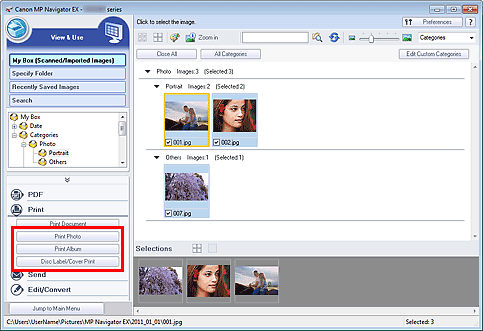
Select images and click Print.
Click Print Photo, Print Album, or Disc Label/Cover Print on the list.
Easy-PhotoPrint EX starts. See "Printing with the Bundled Application Software (Easy-PhotoPrint EX)" for details.
NoteIf Easy-PhotoPrint EX is not installed, print with MP Navigator EX.
Select images and click Print.
Click Print Photo on the list.
Specify print settings as required.
In the displayed dialog box, specify paper size, the number of copies, etc.
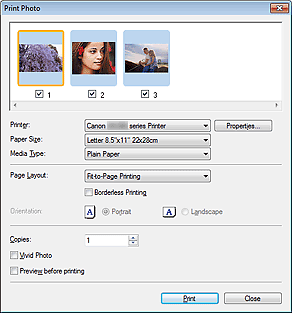
Click Print.
Starts printing.
NoteTo cancel while spooling, click Cancel. To cancel while printing, click Cancel Printing in the confirmation window for the printer status. To open a confirmation window for the printer status, click printer icon on the taskbar.

