
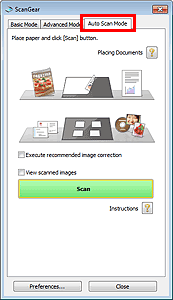
Use the Auto Scan Mode tab to scan easily by automatically detecting the type of document placed on the Platen.
 Important
Supported document types are photos, postcards, business cards, magazines, newspapers, text documents, and BD/DVD/CD. To scan other documents, specify the document type on the Basic Mode tab or the Advanced Mode tab.
Place the document on the Platen, then start ScanGear (scanner driver).
Click the Auto Scan Mode tab.
The Auto Scan Mode tab appears.
 Note
NoteSelect the Execute recommended image correction checkbox to apply suitable corrections automatically according to the type of document to be scanned.
Click Scan.
Starts scanning.
NoteA response of ScanGear after scanning can be specified in Status of ScanGear dialog after scanning on the Scan tab of the Preferences dialog box.


